
Conway's Game of Life on the BLiTTER
 The Atari ST’s BLiTTER chip was designed for one thing: moving rectangles of
pixels around as fast as possible. It’s not a processor. It can’t branch. It
has no ALU. And yet, buried inside it is a smudge mode that turns its halftone
pattern registers into a 16-entry lookup table — which means, if you’re
creative enough with your data layout, you can coax it into doing arithmetic.
The Atari ST’s BLiTTER chip was designed for one thing: moving rectangles of
pixels around as fast as possible. It’s not a processor. It can’t branch. It
has no ALU. And yet, buried inside it is a smudge mode that turns its halftone
pattern registers into a 16-entry lookup table — which means, if you’re
creative enough with your data layout, you can coax it into doing arithmetic.
Which raises an obvious question: could you run Conway’s Game of Life on it?
Inspired by Paranoid’s BLiTTER FAQ, I learned that enabling smudge mode turns the halftone pattern into a 16-entry lookup table. Paranoid uses this to implement saturated increments and chunky to planar conversions (albeit slightly slower than the fastest m68k solution using movep instructions, it could still be useful in some cases.)
Note: For the rest of this article I assume you have some knowledge of how the Blitter works. I recommend taking a look at Paranoid’s FAQ and Atari’s official docs if you need a brush-up.
Lookup tables mean we can approximate some rudimentary calculations. Game of Life needs to count neighbours and apply a simple rule table — could that be enough?
The rules are simple. The Wikipedia article on Conway’s Game of Life describes them as thus:
The universe of the Game of Life is an infinite two-dimensional orthogonal grid of square cells, each of which is in one of two possible states, alive or dead, or “populated” or “unpopulated”. Every cell interacts with its eight neighbours, which are the cells that are horizontally, vertically, or diagonally adjacent. At each step in time, the following transitions occur:
- Any live cell with fewer than two live neighbours dies, as if caused by underpopulation.
- Any live cell with two or three live neighbours lives on to the next generation.
- Any live cell with more than three live neighbours dies, as if by overpopulation.
- Any dead cell with exactly three live neighbours becomes a live cell, as if by reproduction.
The BLiTTER can’t count pixels directly — but let’s see how close we can get.
Assuming the initial pattern is stored in a monochrome bitmap, my first sketch of an algorithm looked like this:
- Expand the bitmap, copying each pixel to one word per pixel. (A reverse chunky-to-planar conversion.)
- While we’re at it, include info on the pixel to the left and right.
- Merge in the six pixels from the rows above and below.
- Loop through the extracted pixels a few times, using smudge mode and halftone patterns to convert neighbour data into a count.
- On the last pass, combine the current pixel with the count and the rules to determine the next state.
- Convert the wide pixels back to the original bitmap.
- profit!
Here’s what I ran into: there are 9 pixels surrounding each pixel, but the halftone registers can only map 4 pixels at a time. And the final count has to fit into 4 bits alongside the pixel itself for the decision table. Representing 0–9 needs 4 bits — but luckily we only need to count to 4, since anything higher produces the same result.
I revised the algorithm accordingly. The details follow.
1. Count surrounding rows first
I decided it was easier to count the pixels above and below the current pixel first. And that it could be done while looping through the original bitmap. And to top it all, I decided to process two pixels at a time, meaning I could grab four pixels from the rows above and below.
Let’s consider a pixel array like this:
| a0 | a1 | a2 | a3 | … |
| b0 | b1 | b2 | b3 | … |
| c0 | c1 | c2 | c3 | … |
| … | … | … | … | … |
Pixels b1 and b2 have pixels a0, a1, a2, and a3 as their combined upper neighbors (sharing a1 and a2.) If we shift pixels a0 - a3 to the right so they can be used as the halftone lookup entry, we can construct a table like this:
| bit pattern | pixel count (left pixel, right pixel) |
|---|---|
| 0000 | (0,0) |
| 0001 | (0,1) |
| 0010 | (1,1) |
| 0011 | (1,2) |
| 0100 | (1,1) |
| 0101 | (1,2) |
| 0110 | (2,2) |
| 0111 | (2,3) |
| 1000 | (1,0) |
| 1001 | (1,1) |
| 1010 | (2,1) |
| 1011 | (2,2) |
| 1100 | (2,1) |
| 1101 | (2,2) |
| 1110 | (3,2) |
| 1111 | (3,3) |
Munging this into a suitable halftone table, we now loop through the source bitmap and store the partial pixel counts into the temporary buffer. That should give us a table containing the counts for the three pixels above and below. Using a combination of an endmask and encoding the counts as a pair of bits, we can cram the counts into adjacent 4 bits in our buffer.
2. Sum the (still partial) counts
Next we need to sum the counts for the row above and below. Our temporary buffer now contains a pair of counts (2x2 bits) that we want to sum up.
Summing two 2-bit numbers can be done as a lookup using the halftone map. Four bits give us exactly 16 combinations, summing up into a 3-bit sum:
| Bit pattern | sum | final bit pattern |
|---|---|---|
| 0000 | 0 + 0 = 0 | 000 |
| 0001 | 0 + 1 = 1 | 001 |
| 0010 | 0 + 2 = 2 | 010 |
| 0011 | 0 + 3 = 3 | 011 |
| 0100 | 1 + 0 = 1 | 001 |
| 0101 | 1 + 1 = 2 | 010 |
| 0110 | 1 + 2 = 3 | 011 |
| 0111 | 1 + 3 = 4 | 100 |
| 1000 | 2 + 0 = 2 | 010 |
| 1001 | 2 + 1 = 3 | 011 |
| 1010 | 2 + 2 = 4 | 100 |
| 1011 | 2 + 3 = 5 | 101 |
| 1100 | 3 + 0 = 3 | 011 |
| 1101 | 3 + 1 = 4 | 100 |
| 1110 | 3 + 2 = 5 | 101 |
| 1111 | 3 + 3 = 6 | 110 |
The actual values I used in the halftone maps are a bit different in order to control where I want to place the results. Using this map, I perform two passes with the temporary buffer both as the source and destination. (Two passes, as I store information about two pixels in each word.)
3. Patch in information about the current row
Let’s assume that each byte in the buffer now contains the sum calculated above shifted left by two bits:
| upper byte | lower byte |
|---|---|
| 000XYZ00 | 000xyz00 |
(where XYZ and xyz are the three bit sums calculated in step 2.)
Now we want to include information about the current row including the pixel itself, so our buffer will contain entries like this:
| upper byte | lower byte |
|---|---|
| 00CXYZAB | 000cyzab |
Where C is the current pixel, and AB is the count of pixels to the right or left of it. We can use a halftone map similar to when counting the pixels above and below, and again, we can process information for two pixels (ie. reading 4 pixels from the current row) at a time.
4. Final sum
Now to add the left and right pixels. We stored that count adjacent to our 3-bit sum, so we can use the same trick as when summing up the upper and lower rows.
But isn’t there a problem here? We now need to add together a 3-bit and a 2-bit number, and that’s 1 bit too many to handle in a single pass. I figured out that if I only add up the lowest two bits of the initial sum and don’t overwrite the third bit, everything will work as before:
If the initial sum is 4 or larger, we actually don’t need the result from this addition, as according to the rules, when the count is larger than 3, the cell should be cleared. The only corner case is when the final sum would overflow from a number less than 4. In our case, we ignore the third bit and the number will wrap around. Since the number of pixels in the same row can be maximum 2, 2+3 will wrap around to 1 and 2+2 to 0 instead of 5 and 4 respectively (any other combinations will not carry, and we’re therefore safe). We are again saved by the rules, as the result for 0 and 1 neighbors is the same as for 4 and 5.
5. Apply the rules
After that final sum, we now have the current pixel and a 3-bit count in our buffer. We now just need to figure out what the final pixel value should be and write that into the buffer.
I will show here the actual halftone map used in my code:
static const uint16_t game_of_life_rules[] = {
            // patt: cp count result
    0x0000, // 0000:  0 0  -> 0
    0x0000, // 0001:  0 1  -> 0
    0x0000, // 0010:  0 2  -> 0
    0xFFFF, // 0011:  0 3  -> 1
    0x0000, // 0100:  0 4  -> 0
    0x0000, // 0101:  0 5  -> 0
    0x0000, // 0110:  0 6  -> 0
    0x0000, // 0111:  0 7  -> 0
    0x0000, // 1000:  1 0  -> 0
    0x0000, // 1001:  1 1  -> 0
    0xFFFF, // 1010:  1 2  -> 1
    0xFFFF, // 1011:  1 3  -> 1
    0x0000, // 1100:  1 4  -> 0
    0x0000, // 1101:  1 5  -> 0
    0x0000, // 1110:  1 6  -> 0
    0x0000, // 1111:  1 7  -> 0
};
I apply this map twice again to process the upper and lower byte in each word, masking out the writes, so I now have either 255 or 0 in each byte.
6. Copy the results back
Here I simply loop through each word in the buffer and copy the middle two bits back into my source image.
TAH-DAH!
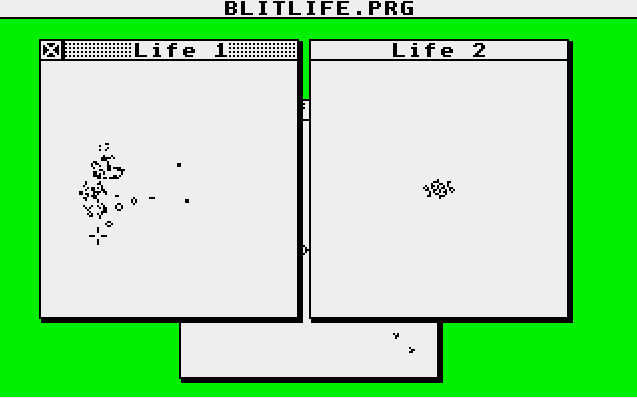
And that’s basically it. I have created a simple (and ugly) GEM application that wraps my blitter algorithm. It hard codes three images and opens each in their own window. Closing all windows will exit the application. If you want to experiment with other patterns, you will have to modify them in the source and recompile the application. Also note that you need an ST with a blitter chip. The code does not test for it and will most probably bomb out if you try to run on a machine without… It may even bomb on a machine with one. ;)
Downloads:
- Source: Github Repository
- Binary: blitlife.prg